
Category: business

This section is for articles pertaining to web development, design, or marketing and businesses that uses these tools. It may also cover stock market trends or trading insight.

  • No Code Required

    No Code Required

    I’m seeing more and more of the bullet point (or even primary sales pitch) for no code required or no code needed. Do it yourself (DIY) is a thing. A lot of us want the independence and freedom to do things without people involved or in software engineering – no code involved/required. I remember when Flash was the absolute top notch thing. It cause serious havoc and it also produced amazing movie teaser websites. Then, not unlike a finger snap, someone said, “no more Flash.” And, over a short period of time, that platform was abandoned.

    What I’m alluding to is that technology has cycles. It changes and morphs to the needs of society or re-invents to amaze crowds of folks. It’s great sometimes and it can kill the mood in other times. I also remember when web development was profitable. You can probably make an argument that it still is, but way too many people are aware of the DIY solutions out there. I use (and promote) WordPress. And with that, if anyone learns that they can “WordPress” themselves, I’m rendered obsolete.

    Ok, “obsolete” is a bit dramatic. Sorry!

    What did I do to counter this? I actually didn’t “counter” it at all – I adapted and incorporated it into my site building and project processing.

    Outside of WordPress though, there are other instances that provide obstacles (or hurdles) that we either see coming or they knock us off our high horses.

    animated gif - a cat and horse in a stable and the cat leans over and rubs the face of the horse

    This is where I stop talking about code, logic, ingenuity, complex problem solving, languages, classes, markup, and switch over to you and me. Apart from building, creating, and doing awesome stuff, we also need to eat and provide for ourselves. One consideration that will keep us on track is to stay ahead of the curve. Can you adapt to new technology or are you “set in your ways?” The “no code” route is one of the ways we need to adapt. While some pop-up business is offering a “no code” solution, they may leave off customer service. Or maybe there’s little to no customization for the customer to adjust. These issues actually aren’t issues at all – they’re opportunities. If you can provide a better customer experience than a start up, you could have something.

    Am I frustrated about investing a massive amount of time to learn and training so that I can say “I program?” A bit, yes. But I can’t focus or spend much time trying to figure something out while it’s being overlapped by the competition. I have to adapt and overcome and so I do just that. I also have to do what EVERY other programmer is good at, and that’s finding a solution to a (complex or dynamic) problem.

  • Upside: Free Online Course

    Upside: Free Online Course

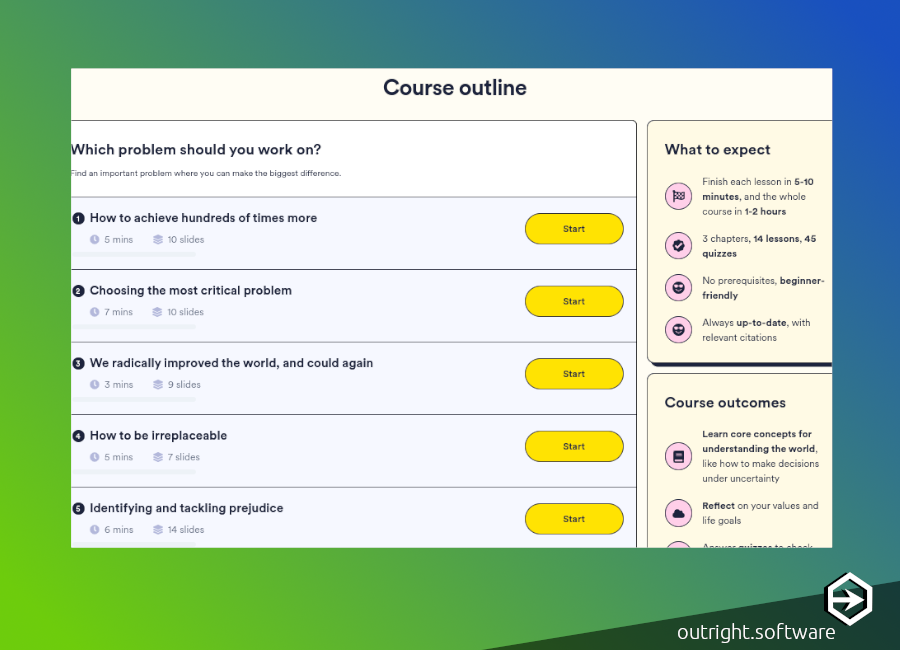
    Ever wonder what could be done with your time / career to help others? Or maybe you are helping others and would like to learn more about similar opportunities in your career with a free online course? Viola! Non-Trivial.org is providing just that. Whether you’re a seasoned office hustler or the new gal on the block, here’s a free course to help out with making decisions with a altruistic outcome. Plus, it’s always good to “shop-around” when looking for positions in other organizations in today’s work environment as merited pay increases have slowed since the late nineteen seventies.

    Let’s say a social worker is employed by the state or your county. Let’s also say there is a lateral position in the private sector that offers more, or has a better organizational structure, or has different benefits for that same person. They can weigh the pros and cons, but here’s another tool to help assess the path and what that person would like to do if it is aligned with serving a greater good. Use this free online course and other resources on the site for career development.

    https://course.non-trivial.org/

    Also, there’s a scholarship in the site that this appears on. It’s for younger folks (ages 14-20) that have not entered higher education, yet. It awards up to 15,000 (minimum of $500) and gives access to guidance from staff at universities, and applications close on August 25th. I’m not aware if this will recycle or that this year is the end. The application requires an email, a form, and a memory quiz, which I did not attempt even though I’m very curious.

  • Google Investing in Cloud Tech

    Google Investing in Cloud Tech

    According to several sources (WSJ, CNN), Google is considering investing in cloud tech by purchasing a cloud-based tech security startup called Wiz. It will be (speculative) the largest acquisition for Alphabet (Google) which would be almost double what it paid for the acquisition of Motorola which was 12.5 billion. The price on the table is currently 23 billion, but talks are still happening. Google also purchased Mandiant, a cyber security firm, in 2023 and looks to catch up with Microsoft / Amazon in terms of security. This follows a recent hack discovered with Google’s Chrome browser in January and another in December: both zero-day vulnerabilities.

    Google is the developer of Flutter and Firebase – both of which are VERY much on my radar. I’ve been learning and working with the .dart language for over a year and will continue to do so regardless. I do (extremely) appreciate security and take these maters seriously. I also want to encourage you to update your Chrome browser if you haven’t since January.

    Google investing in security is a good thing – it signals a turn towards stability and efficacy for Google, it’s customers, and it’s users. It’s not the only tech giant having issues. Microsoft had a report issued by the U.S. Congress earlier this year concerning a hack that accessed Microsoft’s email exchange server exposing 22 organizations and hundreds of employees to include Secretary Gina Raimondo.

    To update Google Chrome:

    1. On your computer, open Chrome.
    2. At the top right, click More More.
    3. Click Help and then About Google Chrome.
    4. Click Update Google Chrome.
      • Important: If you can’t find this button, you’re on the latest version.
    5. Click Relaunch.