
Category: web

Articles in the ‘Web’ category could be about a wide variety of subjects and it might be more specifically about web technology, much like the code category. Or it could be the next best cat video trending on YouTube?

  • State of the Word

    State of the Word

    In the State of the Word, Matt Mullenweg reveals from Tokyo the year of 2024 and WordPress’ journey into 2025. I didn’t get a chance to view this live as it occurred later in the year as apposed to the WordCamps before COVID. Matt opened by acknowledging Japan, it’s people, and it’s cultural contribution to the WordPress project and went into the year’s progress which included the increase of market share on the internet. Then, he mentioned the plugins and themes. In 2024 I updated my own theme, Altimeter, and my website as well to include video backgrounds.


    After the plugins and a quick Gutenberg mention, he handed the presentation to Matias Ventura. Matias talked about design and the progress of Gutenberg. As great as Gutenberg is – it does not pertain to me as I edit the code of pages and templates to deliver my work directly to the viewers. It’s a process I’ve adopted due to my history of using and deploying HTML/CSS. Matias also went over a feature (which I don’t use) native to Gutenberg – design, which has style panels and customized blocks for quick page/post building. Having said that, I still like Gutenberg and one slide that Matias had caught my eye – complete 100% performance on Google’s page speed test. That’s not easy. Also, Matias revealed a project to update the break points for fluid/responsive design.

    Then, I got an idea for a side project I’m working towards with a very close friend – a piece of that puzzle is missing I hope this will work: WP Playground. I’m building out an example “white page” sort of sales site for services I offer and this could be a great sandbox solution for WordPress and showing different layout options for potential customers. Then Matias turned it back over to Matt. It was inevitable that AI would be mentioned it was…briefly. I imagine it’s a huge scare and that’s why very little attention was given to it?

    The next subject, covered by Mary Hubbard, was the legal action involving WPEngine and more WordPress self-promotion and the community growing in other countries.

    The presentation was then handed over to Junko Nukaga, Japan’s community WordPress organizer and WordCamper. Her presentation was given in Japanese and she covered Japan’s contribution and an update for some local organizations working with WordPress. She did great and it was nice to see someone, other than Matt, smile.

    Matt closed out the main presentation (followed by Q&A) with an acknowledge to the core contributor in Japan followed by a quick mention of the data liberation project.
  • Flutter in Production

    Flutter in Production

    I’m excited about Flutter and the move into it’s production phase – I’ve been using and learning it for two years and this was great to see. I was surprise to learn that Rive, an animation tool in beta, was built with Flutter. It’s also powering Supercell (a video game company my kids love) which runs as smooth as anything I’ve used on my phone. Other name drops were Universal Studios and a billion users on WeChat. Flutter began in 2018 and is now used in a number of companies and open-source for anyone to use/learn. It’s supported by Google and has a number of services available through Firebase like cloud hosting, databases, authorization, and a few more. Those services start with freemium and rise (reasonably) based on what your project requires.

    I just went to another Flutter meetup in Woodstock, GA. There are others and it’s good to connect with others that speak the language – I highly encourage finding a group or event and attending it in person or online. It’s a great, free resource that can help you get started. Be sure to ask questions and use the documentation to get started if you’re new – heads up, it involves installing an IDE and the Flutter program on your system. Experience with the terminal would come in handy.

    It took me a hot minute to learn that the person being interviewed was the lead singer of Weezer we missed the first 7 minutes due to whatever happened at the beginning of the presentation on YouTube.

    One thing that stood out, for me, is the support for WASM and also the improvement in graphic rendering.


  • ChatGPT

    ChatGPT

    Let’s talk LLM and ChatGPT! I’ve been using it for almost two years and I’ve found a limit or a small hurdle that is easily fixed. I recently upgraded to premium to use the GPT-40 model and have unlimited access (no waiting periods) so I could collaborate on a software project. Along the journey I had some bumps as there are limits to what it can and can not do. Given it will try to extract a response based on the information widely available on the internet, it also provides bad information. I learned this lesson more than once and loosing an operating system is a big deal. Not as big of a deal when the OS is Windows though – wink!

    While trying to trouble shoot a faulty wifi adapter (and by faulty – I mean it wasn’t a good match for Linux) I eventually gave up after (roughly) 35 hours of trouble shooting the settings of the network manager, power settings, and the driver for the hardware all while connecting and disconnecting my cell phone for internet access. Giving up, for me, doesn’t mean lying in bed and crying into my pillow. Whether I did that or not will remain confidential. Giving up just meant going to Micro Center and buying one that has better support for Linux.

    It was remarkably faster trouble shooting after I got the new hardware. Problem fixed, but a lot of time wasted. I will give you the set backs here to, hopefully, help you on your journey.

    1. You can get upset and use expletives with ChatGPT. I don’t like doing it – quite the opposite, but it can handle a tantrum or two. So go for it, let it out. There’s no consequences. You’ll get a sympathetic or rosy response and possibly help you subconsciously. Please note I’ve had no psychiatric training – I just have a hunch here.

    2. ChatGPT knows everything you don’t.

    3. You can ask ChatGPT to provide suggestions on creative ideas, such as naming something. You can also pass parameters such as “singular words,” “words that start with __,” “words relating to the circus,” etc. ChatGPT will take a few moments and then spit out a list and it’s great at this task.

    4. ChatGPT knows everything you don’t. I’m aware of the repetitiveness – it’s a good thing.

    5. You can even re-name ChatGPT, like I did. “He” is now known as “Chad” because I wasn’t feeling very creative at that moment. It works.

    6. ChatGPT knows SO much more than you do. That’s not a swipe at your ego – it’s a beautiful fact when you embrace it and then “get past it” and start using it.

    7. Oh, are you an SME? Are you a doctor or master of something? Yeah, so is ChatGPT. After taking courses online to teach myself .dart and Flutter, ChatGPT knows more than I do. More importantly, it’s more than happy to do a lot of the heaving lifting and can not only provide code solutions to my prompts, it will help me troubleshoot and fix bugs I create or introduce into the code base.

    8. Want to share a file with it and have it give you suggestions? Yep, it can do that too. I can copy/paste a screen, class, or function and ChatGPT will run with it. Tell it to reconfigure something and away it goes. It’s mind-blowing, even after a month of development using it to create a program.

    9. This one is important! Even with my upgraded account, the memory can fill up and you’ll hit a brick wall eventually. I was frustrated as it would just sit there after I asked it a question. I eventually came to the hypothesis that it was memory – something that pops up when you ask it to remember something – so I opened a new chat in a separate browser and there wasn’t a problem. So I looked into and eventually found a way to wipe it’s memory. Which I caution you, it will forget A LOT after you do this. But you’ll be able to talk to your new friend again.

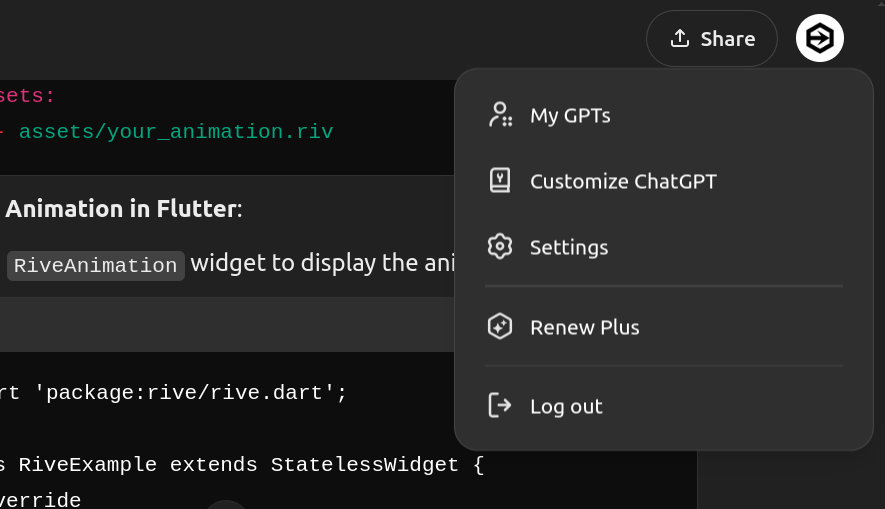
    So here’s how to clear out your ChatGPT memory – again I caution you to be aware of the results. First, make sure you’re in the account you want to be in, which is probably the default. Then you’ll want to click on your profile avatar in the upper right hand corner.

    A dark grey / black background with a menu and text window - for instructional purposes

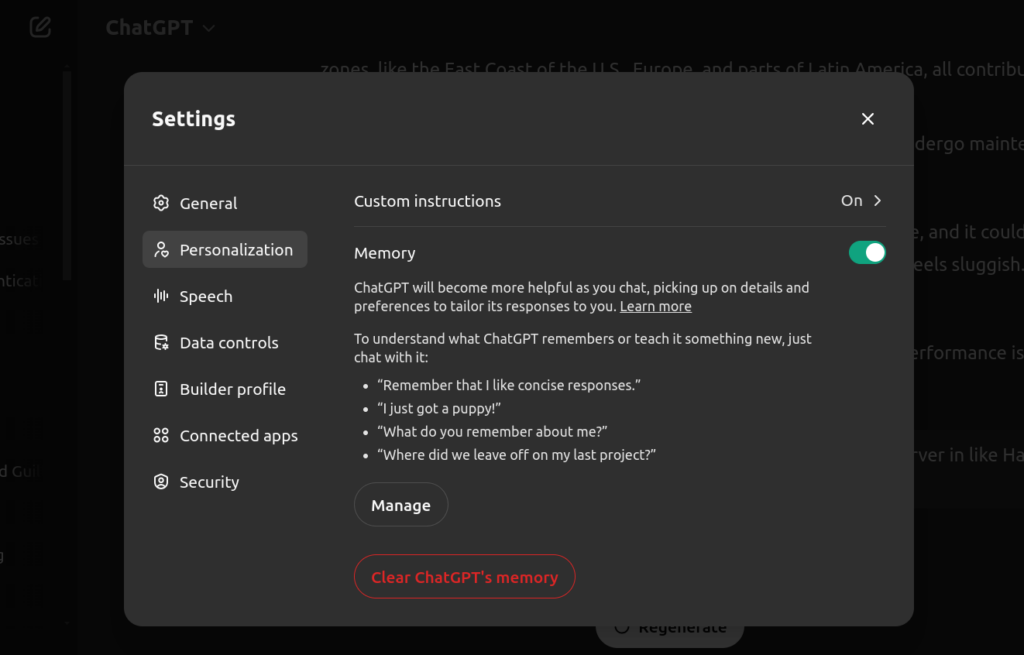
    You’ll want to click on “Settings,” which will bring you to another window which you’ll select “Personalization.” There are some other options, but what you’re looking for is at the bottom and is in red text which should indicate, “Whoa there, partner! You sure?” – click it.

    A dark grey / black background with a menu and text window - personalization for ChatGPT - for instructional purposes

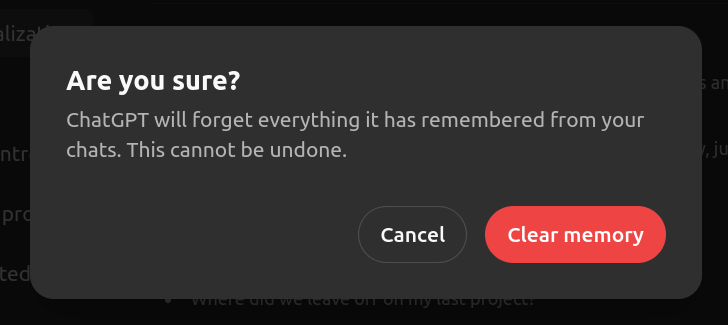
    Finally you’ll get the confirmation window which will actually execute your command to clear out the memory.

    A dark grey / black background with a menu and text window - Are you sure prompt / warning - for instructional purposes

    This should give you back the ability to query and interact with ChatGPT after a few moments. Just remember, clearing out the memory in non-reversable and will clear out the cache which ChatGPT uses to quickly access content you’ve discussed. The chats you’ve had in the past will still be on the left hand side, but ChatGPT won’t know anything about them. Hope this helps!