
Author: Graham

  • Upside: Centered Vertically

    Upside: Centered Vertically

    Have you ever been deep in the CSS and wanted to have an element (paragraph, divs, etc.) aligned vertically? I have. Maybe you haven’t, but my front end folks are nodding their heads and making sad developer noises. Maybe you already knew or you have a hack for this, but it’s still great news. All of the major browsers, this year, have implemented the CSS “align-content” property! That’s right, your junk will now display centered vertically if you should choose to try one last time. Here’s the code:

    <div style=”height: 700px;”>
    <p style=”align-content: centered;”>Hallelujah</p>
    </div>

    Horizontally aligning has always been a hurdle I’ve learned to jump a long time ago. Bootstrap makes it even easier with the container-row-col system. But centered vertically elements, honestly, I’ve just committed to the stack of, “oh well’s” and moved along without considering it much. To me it’s an easily overlooked item, but I think it’s a massive plus.

    And it’s supported by the following browsers:
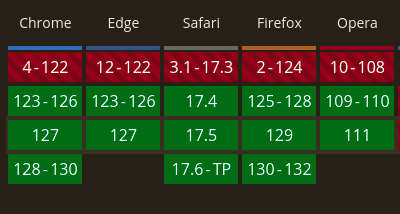
    A brown box with 5 browser names at the top: chrome, edge, safari, firefox, and opera in white text. Below each name is a column of red or green blocks. The bottom being the most recent which are all green indicating that they support the feature.Source: caniuse.com

    Pretty wild, right? I’m excited. Ok, the excitement has left. Thank you James Smith for the heads up on this feature. Now the question (seriously) is, “Will I remember it when I need to?” Well, it’s important to pass along. I like doing that. Offering information should anyone even ask for it is, to me, important. I walked into Publix and an older man was walking his dog and I started to walk the other way. When you see a service dog, it’s natural to avoid as to not distract him/her but the man said “Oh, no – he doesn’t bite. He’s a good little guy.” And that was enough for me I immediately came over and “made a friend” as most dogs and I get along like old friends separated at the pirogi fest in 2005 and reunited to enjoy something we can’t explain. The older man then explained the dog is for his diabetes and I immediately thought “Oh, let’s share something he didn’t ask for.”

    So, I told him about breakfast pitas that are sold in the freezer section which have below 15 carbs. He thanked me (honestly) so I showed him exactly where the pitas were in the freezer section and he actually seemed interested and thanked me. Not always the reception I get when sharing. But I feel really awesome when I get that reaction or when I can share something educationally and somebody “gets it.”

    I’m hoping this helps a few – it doesn’t have to be many.

    Also, if you missed it last week, I launched Altimeter – a free WordPress theme. Check it out – my approach is primarily disabling Gutenberg. The examples have a few bootstrap elements and a top video background. This is an advanced (and extremely niche) WordPress tool and I don’t recommend if you like using page layout systems versus code.

  • Altimeter

    Altimeter

    It was time to dance my fingers on the ol’ keyboard and update Altimeter, being it’s original launch was in 2019. I love the idea of making money and charging folks for using my code, but giving it away is more my style. Money can be made farther down the road offering something else. This project uses open source code and free resources, so it’s more appropriate to open source the WordPress theme and let everyone tinker with it.

    It does require a sign-up, but I promise not to spam or send stuff relentlessly. Also, I don’t share or sell anyone’s information. Those two facts are carved in stone.

    What does it do? If you’re publishing sites with WordPress, you already know what a theme is. But if you’re new, you can learn more about WordPress core, themes, and plugins here. This theme comes with Bootstrap installed and Gutenberg disabled. It also has 2 page templates. You can ignore the “template-with-sidebar,” or use it as needed but what you’re really looking for is “page-template-example.php.” This template has a video background (like the top banners of this site) and those videos can be swapped out for your content.

    Following that, there is are a few layout examples in a carousel; all of which are Bootstrap. After that, there is a section with .php displaying posts in multiple columns. If you are plugging this theme into a live site, be sure to use the “live preview” feature first. You should see your existing content fitting into the page/single/archive/search php layouts.

    It’s not perfect, but it can be a great tool if you approach it from the mindset of “I’m going to use code and build using Bootstrap.” You can easily remove bootstrap if required/desired. And, if you want to veer into Gutenberg, you can enable in functions.php. Also, it’s implied that you can structure pages (not posts) as needed by duplicating the “page-template-example.php” and altering the code. The posts don’t have any bells or whistles too hassle with.

    I’d love to hear your feedback – please use constructive advice.

    In the future, I’d like to make more page templates for even more starting points.

  • Upside: AI Used to Reduce Traffic

    Upside: AI Used to Reduce Traffic

    A screen shot from a phone with google maps. The map is downtown Atlanta and most of the streets are dark red indicating that the routes are heavy with traffic.In January, Google unveiled a good use for AI and it just makes sense – less traffic. We already have engineers that can measure the time required at intersections and then adjust the time of traffic flow, but now “Operation Green Light” can leverage the traffic patterns from Google’s advanced maps to offer suggestions. City engineers can then implement (within minutes) the suggestion from the program with the aim to reduce stop-and-go traffic.

    I recently had the experience of driving from Lathemtown to downtown Atlanta. Knowing how bad it can be, I left at 4:30 to give myself some extra time and arrived at 6:15. Almost double the amount it normally takes. I was an absolute wreck by the time I got to my GDG meeting to go over some fun stuff with Twitter. The group was extremely nice even though I was embarrassed showing up late.

    Recently, AI has been all you will hear or read about in the news or online. Companies like Microsoft, Meta, and Amazon have invested heavily into AI to incorporate into their offerings. Personally, I’m tired of hearing about it, but this is a case of AI being used properly to offset traffic and move humanity forward.

    To think that this (completely logical) program could have the effect it would is fantastic. It’s is being tried out in several countries around the world – 17 cities – which would effect up millions of trips and could potentially reduce up to 30% of waiting at a traffic light. The result to remove 10% of emissions from car exhaust. And that may seem like a small number, but it’s really great in the larger scheme of things. Every bit helps and the shift in renewable energy just makes it that more satisfying if you like Earth.

    I want to emphasize this is still in testing. Every good project should test out the service or product before delivery and that’s happening right now. Thanks to CBS for this – more can be viewed or read here!

    I do not receive payments, reimbursements, or any other kind of compensation from Google. If you’d like to know more about the GDG, just let me know.